Feature Modules
How code is organized - everything for a feature lives together
TL;DR: All code for a feature lives in
/src/features/name/. Queries, actions, validation, types, UI - one folder.
The Problem This Solves
Traditional projects scatter code everywhere:
- Database queries in
/models/ - API routes in
/api/ - Components in
/components/ - Types in
/types/
To understand "clients", you jump between 5 folders. To add a field, you edit 8 files across the codebase.
The Straktur Way
Everything for a feature lives together:
src/features/clients/
├── queries.ts      # Read from database (list, get, search)
├── actions.ts      # Write to database (create, update, delete)
├── validation.ts   # Input schemas (shared between API and forms)
├── types.ts        # TypeScript types
├── index.ts        # Public exports (safe for browser)
├── server.ts       # Server-only exports (database access)
└── ui/             # Feature-specific components
    ├── ClientCard.tsx
    └── ClientForm.tsx
Why this matters: When you say "add invoices feature", AI creates this exact structure. When you say "add field to clients", AI knows exactly which files to touch.
Concrete Example: Clients
The Clients feature lets you manage companies in your CRM. Here's how the code maps to what users see:
| User action | Code location | What happens |
|---|---|---|
Opens /clients page | queries.ts → listClients() | Fetches all clients for this organization |
| Clicks on a client | queries.ts → getClient(id) | Fetches single client with contacts |
| Fills the form | validation.ts → clientSchema | Validates input before saving |
| Clicks "Save" | actions.ts → updateClient() | Updates database record |
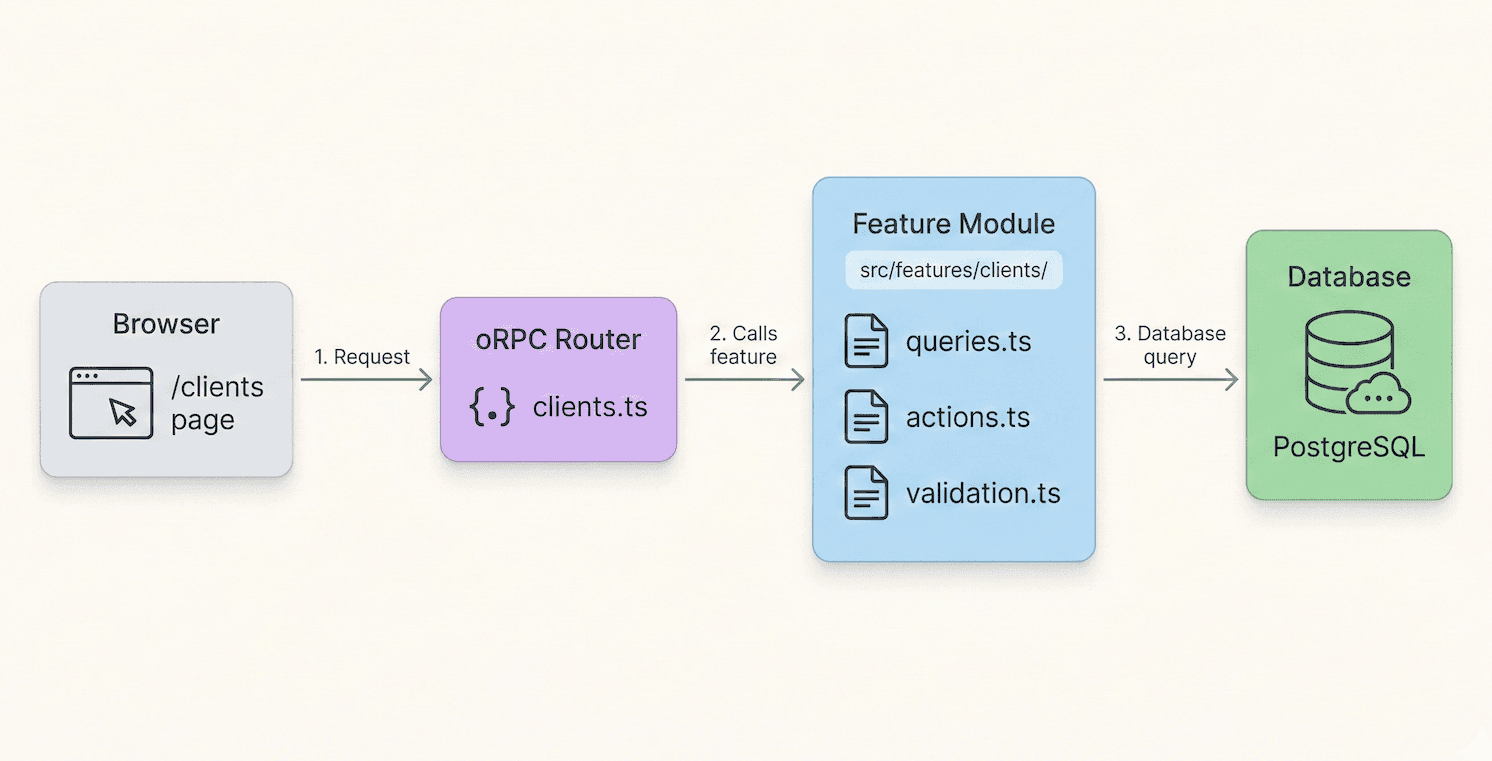
The Two Entry Points
Features have two exports to respect Next.js client/server boundary:
index.ts - Safe for browser (React components, hooks, types)
// ✅ Import in Client Components
import { ClientCard, clientSchema } from "@/features/clients"
server.ts - Server only (database access)
// ✅ Import in Server Components, API routes
import { listClients, createClient } from "@/features/clients/server"
Never import server.ts in Client Components - it will break your build.
What This Means for Your Prompts
| You say... | AI does... |
|---|---|
| "Add invoices feature" | Creates /src/features/invoices/ with all files |
| "Add due_date field to invoices" | Edits validation.ts, types.ts, queries.ts, actions.ts |
| "Copy clients pattern for invoices" | Replicates the exact structure |
Related
- Add New Feature - Step-by-step guide
- Add Field to Entity - Checklist for adding fields